
Understanding Different Types of Clusters in Databricks Made Easy

Overview of Databricks Clusters

An Overview of clusters in data Bricks
- What Are Clusters in Databricks?
These are groups of virtual machines that work together to process and analyze data. - Purpose:
These are Used to run data engineering tasks, data science experiments, and big data analytics. - Types of Clusters:
- All-Purpose Clusters: For multiple users, used for notebooks, machine learning, and collaborative tasks.
- Job Clusters: Created automatically for running specific tasks and terminated after the job completes.
- Key Features:
- Scalability: Automatically scale resources up or down based on workload.
- Preloaded Libraries: Comes with popular tools like Apache Spark pre-installed.
- Interactive Workflows: Run real-time queries and process data collaboratively.
- Cluster Management:
- Configure CPU, memory, and storage based on requirements.
- Add libraries and dependencies as needed.
- Monitor performance and logs for optimization.
- Benefits:
- Streamlines big data processing.
- Supports collaboration for teams working on the same data.
- Optimizes costs by scaling resources dynamically.
Topics included:
Types of clusters in data Bricks
Here’s a list of the different types of clusters available in Databricks:
- Single-Node Clusters: These clusters consist of a single machine and are suitable for testing code, learning the Databricks environment, and developing small-scale data processing solutions. Single-node clusters are cost-friendly and provide an efficient entry point for beginners but have limited processing power.
- Multi-Node Clusters: Multi-Node clusters are designed for large-scale data processing, handling big data, and performing complex algorithms. The clusters have multiple machines (nodes) working together in parallel to process data, offering excellent performance, scalability, and the ability to process large volumes of data.
- Auto-Scaling Clusters:Auto-Scaling clusters are Multi-Node clusters that perfectly adjust the cluster size based on the workload. They are self-optimizing for processing needs and are cost-effective, ideal for scenarios with variable workloads.
- High Concurrency Clusters: High Concurrency clusters prioritize resource allocation among multiple users to support simultaneous queries without performance degradation. They are suitable for an environment where multiple users need to query the same data simultaneously. High Concurrency clusters ensure efficient resource utilization and consistent performance, enabling effective teamwork and collaboration.
- GPU-Enabled Clusters: GPU-Enabled clusters are designed for machine learning and deep learning algorithms requiring intensive computing power. They utilize Graphics Processing Units (GPUs) for faster processing of computational tasks. GPU-Enabled clusters offer significant performance improvements for matrix operations and machine learning algorithms.
These five types of clusters in Databricks provide flexibility, scalability, and efficiency for various data processing requirements.
Single-Node Clusters: A Stepping Stone

Definition and Purpose
- A Single-Node cluster in Databricks is the smallest and most basic cluster size available.
- It runs on a single machine with only one node for processing data.
Advantages and Use Cases
- Single-Node clusters offer several advantages and are well-suited for specific use cases:
Testing and Learning:
- Single-Node clusters are ideal for testing code, exploring Databricks’ environment, and learning data processing concepts.
- They provide a sandbox-like environment to experiment and familiarize yourself with the platform.
Small-Scale Processing:
- Single-Node clusters can be a cost-effective solution for small-scale data processing tasks.
- They are suitable for developing and running small workflows or processing datasets that do not require large computational resources.
Cost-Friendly:
- With pricing starting at around $0.07 per hour, Single-Node clusters are cost-friendly.
- They allow users to leverage Databricks’ capabilities without incurring high infrastructure costs.
Limitations and Constraints
- While Single-Node clusters have their benefits, they also have certain limitations and constraints to consider.
Limited Processing Power:
- Single-Node clusters rely on a single machine for processing, which means they have limited computational resources.
- That makes them unsuitable for handling large amounts of data or performing complex data analysis tasks that require significant computing power.
Scaling Constraints:
- Unlike Multi-Node or Auto-Scaling clusters, Single-Node clusters cannot scale horizontally by adding more nodes.
- They are limited to a single machine, which restricts their ability to handle growing workloads.
- Single-Node clusters are a basic and cost-friendly option for testing, learning, and smaller-scale data processing tasks. Their simplicity and affordability make them valuable for individual users or teams with modest processing needs.
- However, it’s important to recognize their processing power and scalability limitations when considering them for larger or more complex data processing scenarios.
Multi-Node Clusters: Power in Numbers

Definition and Purpose
- Multi-Node clusters in Databricks consist of multiple nodes for processing data.
- These clusters are designed to handle large-scale data processing and can parallel processing across thousands of nodes.
- They offer excellent performance and scalability for complex algorithm management and big data processing.
Advantages and Use Cases
- Multi-Node clusters provide several advantages and are particularly suitable for large-scale data processing use cases.
Excellent Performance:
- Multi-Node clusters offer powerful computing capabilities, enabling efficient processing of large volumes of data.
- They are designed to handle complex algorithms and can leverage parallel processing to maximize performance.
Scalability:
- With the ability to scale across thousands of nodes, Multi-Node clusters provide the flexibility to handle growing data volumes and increasing processing demands.
- They can accommodate big data processing needs and support the scalability required for enterprise-scale workloads.
Complex Algorithm Management:
- Multi-Node clusters are well-suited for managing and executing complex algorithms due to their computing power and parallel processing capabilities.
- They enable efficient execution of machine learning algorithms, graph processing, and other computationally intensive tasks.
Limitations and Constraints
- While Multi-Node clusters offer powerful processing capabilities, they do have some limitations and constraints that need to be considered.
Cost Considerations:
- Multi-Node clusters can quickly accumulate costs, especially with larger cluster sizes.
- It’s important to carefully monitor and manage the cluster size to ensure cost-effectiveness and avoid excessive spending on idle resources.
Complex Setup:
- Setting up Multi-Node clusters can be complex and requires a deep understanding of distributed systems.
- Configuration and optimization of cluster settings may require expertise in managing distributed computing environments.
- Multi-Node clusters are a powerful solution for large-scale data processing, complex algorithm management, and big data workloads.
- With their excellent performance, scalability, and ability to handle parallel processing, these clusters are a valuable asset in data-intensive environments.
- However, managing costs carefully and having expertise in distributed systems is important to effectively set up and configure Multi-Node clusters for optimal performance.
Auto-Scaling Clusters: Efficiency at Its Finest
Definition and Purpose
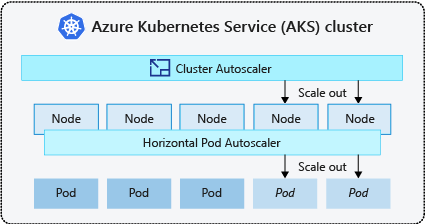
- Auto-Scaling clusters in Databricks are a type of Multi-Node cluster that can scale up dynamically and down based on the workload being processed.
- These clusters automatically adjust their size to accommodate the changing demands of the workload, optimizing resource usage and maintaining performance efficiency.
Advantages and Use Cases
- Auto-Scaling clusters provide several advantages and are well-suited for handling variable workloads. Some of the advantages include:
Cost Optimization:
- With Auto-Scaling clusters, you can ensure cost-efficiency by dynamically scaling the cluster size based on the workload.
- That eliminates the need to monitor and modify cluster sizes manually, reducing the risk of overprovisioning or underutilizing resources.
Workload Adaptability:
- Auto-Scaling clusters are designed to automatically adjust their size, providing the necessary resources to handle variable workloads efficiently.
- This flexibility is particularly useful when workload volumes and patterns fluctuate, such as in batch processing or analytical workloads.
Effortless Management:
- By enabling automated scaling, Auto-Scaling clusters simplify cluster management.
- That reduces the administrative burden of continuously monitoring and adjusting cluster sizes, freeing time for data engineers and analysts to focus on more value-added tasks.
Limitations and Constraints
- While Auto-Scaling clusters offer valuable flexibility and cost optimization, they may have some limitations and constraints, such as:
Resource Consumption:
- Auto-Scaling clusters may consume more resources than necessary due to the pre-warming of additional nodes.
- When scaling up, these clusters proactively allocate resources to ensure efficient performance, which can result in temporary resource consumption even if the increased workload demand hasn’t fully materialized.
Specific Workload Requirements:
- Auto-Scaling clusters are most effective for workloads that exhibit variability and can benefit from dynamic resource allocation.
- However, workloads that require consistent steady-state performance or those with extremely high and constant demands may not be suitable for Auto-Scaling clusters.
- Auto-Scaling clusters provide an efficient and flexible solution for cost-effectively handling variable workloads.
- By automatically scaling up and down based on workload demands, these clusters optimize resource usage and alleviate the need for constant manual intervention.
- However, it is important to consider the specific workload characteristics and resource consumption implications before leveraging Auto-Scaling clusters.
- This evaluation will ensure that the benefits of cost optimization and workload adaptability outweigh any potential drawbacks for your specific use case.
High Concurrency Clusters: Enabling Team Collaboration

Definition and Purpose
- High Concurrency clusters in Databricks are designed to facilitate teamwork and collaboration by efficiently allocating resources between users.
- These clusters ensure that multiple users can run queries and perform data analysis simultaneously without impacting performance.
Advantages and Use Cases
- High Concurrency clusters offer several advantages and are particularly useful in scenarios where multiple users need to query the same data source concurrently.
- Some of the advantages include:
Efficient Resource Allocation:
- Databricks effectively manage resources in High Concurrency clusters, ensuring that each user receives the necessary compute resources to run their queries without performance degradation.
- This optimal resource allocation enables seamless collaboration and teamwork.
Simultaneous Query Support:
- High Concurrency clusters can support multiple users running queries simultaneously, enabling teams to work efficiently and analyze data collaboratively.
- This feature is particularly valuable in organizations with shared data platforms, where real-time data analysis and decision-making are critical.
Limitations and Constraints
- While High Concurrency clusters offer valuable collaboration capabilities, they may have limitations and constraints, particularly when it comes to computationally intensive processes:
Lower Computational Power:
- High Concurrency clusters may not provide the same level of computational power as dedicated clusters built for high-performance computing tasks.
- These clusters prioritize resource allocation for concurrent users, sacrificing some level of computational performance.
Limited to Collaborative Workflows:
- High Concurrency clusters are designed to support collaborative data analysis and teamwork.
- They may not be suitable for processes that require intensive computational power or deep learning algorithms that benefit from GPU acceleration.
- High Concurrency clusters are valuable for organizations prioritizing teamwork and collaborative analysis.
- By efficiently allocating resources between users, Databricks ensures multiple users can work simultaneously without hindering performance.
- While these clusters may not provide the same level of computational power as dedicated clusters, their focus on collaboration makes them an excellent choice in scenarios where real-time collaboration and shared data analysis are essential.
- It is important to consider the specific use case requirements and workload characteristics when deciding between High Concurrency clusters and other cluster types in Databricks.
GPU-Enabled Clusters: Supercharging Data Processing

Definition and Purpose
- GPU-Enabled clusters utilize Graphics Processing Units (GPUs) alongside CPUs for data processing.
- GPUs are specialized hardware designed for parallel computing, enabling faster processing of computational tasks compared to CPU-based clusters.
Advantages and Use Cases
- GPU-Enabled clusters offer several advantages and are particularly beneficial for certain use cases.
- Some of the advantages include:
Enhanced Performance:
- GPUs excel at parallel processing, making them ideal for tasks relying on matrix operations and machine learning algorithms.
- They can significantly accelerate these analytical tasks and provide better overall performance.
Deep Learning and Machine Learning:
- GPU-Enabled clusters are well-suited for running Spark machine learning and deep learning algorithms.
- These tasks often require intensive computing power, and GPUs can efficiently handle the high computational workload, enabling faster training and improved model performance.
Limitations and Constraints
- While GPU-Enabled clusters offer compelling advantages, they also come with some limitations and constraints:
Higher Cost:
- GPU-Enabled clusters have a higher operation cost than CPU-based clusters.
- GPUs are specialized hardware, and their higher cost of entry and maintenance can impact the overall cost of using these clusters.
Specific Programming Skills:
- Utilizing GPU capabilities requires specific programming skills.
- Developers and data scientists need to be proficient in GPU programming frameworks, such as CUDA, to harness the full potential of GPU-Enabled clusters.
Limited Use Cases:
- The improved performance provided by GPUs is limited to specific tasks. Not all workloads can benefit from GPU acceleration, especially those with predominantly sequential processing.
- It is key to assess the specific requirements of the workload before opting for a GPU-Enabled cluster.
- Despite the limitations, GPU-Enabled clusters are a valuable resource for organizations that require high-performance computing for specialized tasks, such as machine learning and deep learning.
- By leveraging GPUs in data processing, these clusters supercharge analytical workflows and enable faster and more efficient processing of complex computations.
- However, it is crucial to carefully evaluate the cost, programming requirements, and workload compatibility with GPU acceleration before adopting GPU-Enabled clusters.
Perspectives on Databricks Cluster Types
Data Analysts’ Perspective
- Data analysts prioritize fast and reliable analytics results.
- For their use case, Multi-Node and GPU-Enabled clusters are the most suitable.
- Multi-Node clusters enable them to process large volumes of data efficiently, while GPU-Enabled clusters accelerate computationally intensive tasks, such as machine learning algorithms.
Data Engineers’ Perspective
- Data engineers focus on managing and scaling distributed systems.
- Their perspective is impartial to specific cluster types as long as they meet the performance requirements.
- They work closely with the data platform and infrastructure and ensure smooth operations across all cluster types.
Data Scientists’ Perspective
- Data scientists value faster iterations and experimentation.
- GPU-Enabled clusters are an ideal fit for their work as they significantly speed up model training and complex algorithm execution.
- Additionally, multi-node clusters are beneficial for testing with larger datasets, allowing data scientists to push the boundaries of their models and algorithms.
Business Decision Makers’ Perspective
- Business decision-makers aim to optimize cost and performance.
- Their perspective revolves around the selection of cluster types based on cost-benefit analysis.
- They assess each cluster type’s expected value and impact on the organization’s objectives, considering factors such as cost optimization, resource utilization, and the potential for improved performance.
- Considering different perspectives when making decisions about Databricks cluster types is important.
- Data analysts prioritize fast and reliable analytics results, and data engineers focus on managing distributed systems, data scientists seek faster iterations and experimentation, and business decision-makers aim to balance cost and performance.
- By considering these perspectives, organizations can align their cluster-type selections with their overall goals and optimize their data processing and analytics workflows with Databricks.
Case Studies: Real-World Applications of Databricks Cluster Types
- Here are three case studies showcasing real-world applications of different Databricks cluster types:
Case Study 1: Single-Node Cluster for Code Development and Testing
- A software development company uses Databricks to develop and test their code before deployment.
- They utilize Single-Node Clusters to write and debug their code in a local environment.
- The simplicity and cost-effectiveness of Single-Node Clusters make them ideal for code development and testing, allowing the developers to iterate quickly and troubleshoot issues efficiently.
Case Study 2: Multi-Node Cluster for Big Data Processing
- A retail company collects massive customer data and needs to perform complex analytics and generate insights.
- Using distributed computing, they employ a Multi-Node Cluster in Databricks to process and analyze the large dataset.
- By leveraging the power of multiple machines working in parallel, the Multi-Node Cluster enables faster processing, scalability, and efficient handling of big data.
Case Study 3: High Concurrency Cluster for Collaborative Analytics
- A healthcare organization has a team of data analysts who need to query and analyze the same dataset simultaneously.
- They utilize a High Concurrency Cluster in Databricks to ensure that each analyst can access and work with the data without performance degradation.
- The High Concurrency Cluster dynamically allocates resources among the analysts, offering consistent performance and efficient resource utilization for collaborative analytics.
- These case studies demonstrate the versatile applications of different Databricks cluster types.
- Single-Node Clusters are suitable for code development and testing, Multi-Node Clusters excel in big data processing, and High Concurrency Clusters facilitate efficient collaboration on data analysis projects.
- Organizations can maximize the potential of their data processing and analytics workflows by selecting the appropriate cluster type based on their specific needs.
Conclusion
- Databricks offers a range of cluster types to suit different use cases.
- For cost optimization, Auto-Scaling clusters are an ideal choice for organizations with varying workloads, while High Concurrency clusters are great for team collaboration and efficient resource utilization.
- GPU-Enabled clusters are designed for machine learning and deep learning workloads for better performance, while Multi-Node clusters excel in big data processing and parallel processing.
- Single-Node clusters are useful in development and testing for quick iterations and efficient troubleshooting.
- Organizations can optimize their costs and performance by considering diverse perspectives and weighing the pros and cons of each cluster type.
- It is also advisable to keep up to date with Databrick’s advancements and improvements to leverage the latest features and functionalities.
Frequently asked questions about Understanding Different Types of Clusters in Databricks Made Easy :
Databricks offers five types of clusters: Single-Node Clusters, Multi-Node Clusters, Auto-Scaling Clusters, High Concurrency Clusters, and GPU-Enabled Clusters.
Single-Node Clusters are used to test code, learn the Databricks environment, and develop small-scale data processing solutions.
Multi-Node Clusters consist of multiple machines working together to process data, making them suitable for large-scale data processing and complex algorithms. In contrast, Single-Node Clusters have a single machine and are more limited in processing power.
Auto-Scaling Clusters automatically adjust their size based on workload, optimizing resource utilization and cost-effectiveness. They are ideal for scenarios with variable workloads.
High Concurrency Clusters prioritize resource allocation among multiple users, ensuring efficient resource utilization and consistent performance for simultaneous queries. They enable effective teamwork and collaboration.
GPU-Enabled Clusters utilize Graphics Processing Units (GPUs) for faster processing of computationally intensive tasks. They are specifically designed for machine learning and deep learning algorithms.
GPU-Enabled Clusters come at a higher cost than other cluster types due to the added computing power provided by GPUs. They also require specific programming skills and have more limited use cases.
For data-intensive analytics, Multi-Node Clusters are recommended due to their excellent performance, scalability, and ability to handle large volumes of data.
Yes, you can manually resize a cluster in Databricks, but Auto-Scaling Clusters offer the advantage of automatic resizing based on workload without requiring manual monitoring and intervention.
The choice of the cluster type depends on your specific needs. Consider factors such as your dataset’s size, algorithms’ complexity, processing power requirements, and cost constraints when selecting a cluster type. Single-Node Clusters are suitable for small-scale tasks, while Multi-Node Clusters, Auto-Scaling Clusters, High Concurrency Clusters, and GPU-Enabled Clusters cater to larger-scale and specialized use cases.