
Windows Azure Storage Explorer: Download, install and setup guide

An Overview Of Azure Storage Explorer!
- What It Is: A free, user-friendly application by Microsoft to manage Azure Storage resources.
- Key Features: Manage Azure Blob, File, Table, and Queue storage seamlessly.
Secure access via Azure Active Directory or Shared Access Signatures (SAS).
Drag-and-drop interface for uploading and downloading data.
Cross-Platform - Compatibility: Available on Windows, macOS, and Linux.
- Usability: Ideal for developers and IT professionals to monitor, edit, and optimize cloud data workflows.
- Integrations: Supports hybrid cloud and integrates with Azure services like Data Factory and Logic Apps
Topics Covered:
Microsoft Azure Storage Explorer: Major Features
- Manages the different types of Azure storages: Blob, Queue, Table, and File.
- Graphical interface to handle files, tables, and queues easily.
- Azure subscriptions are directly connected to enable easy management of resources.
- Multiple account support: manages more than one storage account.
- Ensures secure authentication via Azure AD, SAS, or account keys.
- Supports mass operations for better time management.
- Suitable for developers and administrators to handle cloud storage more effectively.
Azure storage and its function in cloud computing.
Azure Storage Key Features:
- Provides secure, scalable, and highly available storage solutions.
- Supports unstructured data (e.g., documents, videos) and structured data (e.g., tables, queues).
- Guarantees data accessibility and durability for businesses.
- Provides data redundancy and automated backups for reliability.
- Integrates with other Azure services for seamless application deployment.
- Eliminates the complexities of managing physical storage infrastructure.
What is Windows Azure Storage Explorer?
- Windows Azure Storage Explorer is a cross-platform free tool developed by Microsoft to help manage the user’s own Azure storage account.
- It can be used graphically to allow interaction with the Blob, Queue, Table, and File services of Azure, uploading, downloading, organizing, and deleting the data without accessing the Azure portal or command line.
- This includes supporting multiple account connections as well as Azure AD, SAS, and storage account keys with secure authentication. This is good for developers and administrators who deal with Azure cloud storage.
Going further into what the tool is and how it will help with the management of Azure storage services.
- Windows Azure Storage Explorer is an all-inclusive tool, both powerful and user-friendly, that aims to make the development and administrative management of storage resources easier within Azure.
- The user graphically interacts with different storage types, including Blob, Queue, Table, and File Storage, thereby making commands to these complex or on the Azure portal.
Its capabilities include the following:
Easy management of data.
- File uploading and downloading as well as reorganization of data through simple drag and drop actions.
Secure Access:
- Authentication can be done with Azure AD, SAS tokens, or storage account keys.
Multi-Account Support:
- Connect to multiple Azure subscriptions and storage accounts at a time.
Bulk Operations:
- Performing tasks such as uploading or downloading files in bulk increases productivity.
Cross-Platform Support:
- It works on Windows, macOS, and Linux, offering flexibility for teams with diverse systems.
- This application is suited for the management of both small and enterprise-scale data. It has an easy and efficient way to handle cloud storage resources.
- Users can use Windows Azure Storage Explorer to manage and organize their Azure storage data without getting through complicated configurations and interfaces.
The following are key use cases and who benefits from using it, namely developers and administrators, among others.
- Windows Azure Storage Explorer is an indispensable tool for various types of users working with Azure storage services.
- The following section looks deeper into key use cases and how different types of users can benefit from this:
1. Developers:
Azure stores a lot of different data types, such as blobs, queues, tables, and files.
- With Windows Azure Storage Explorer, developers can upload, download, and organize all of this data.
- In this way, developers can easily test and validate storage scenarios without complex code or scripting; hence, they contribute to simplifying the development workflow.
Additionally, managing large numbers of storage accounts located throughout diverse subscriptions for which administrators will account will benefit immensely.
- Its functionalities are easily enabled for storage accounts creation, administering, configuring privileges to access their accounts, monitoring usage and hence, deal better with backing-up and transferring lots of data within accounts as the case with making large movements as in replicating large quantities of files across two accounts.
3. Business Analysts:
- An Azure business analyst might find a need to query structured data that is available in Table Storage, or huge sets of files held in Blob Storage.
- Windows Azure Storage Explorer has a user-friendly, non-technical method with no coding abilities required to extract data.
- The tool is thereby helpful for analysts who focus on insight rather than maintaining data.
- Example- An Analyst in the Marketing Team will be able to retrieve enormous datasets from the Azure Blob storage for analysis on his own by using the product without needing assistance from IT.
- The tool can be used by cloud engineers or architects working on large-scale cloud projects to oversee and optimize data storage across various services.
- They can perform routine tasks, monitor storage health, and even resolve issues related to permissions or access control across multiple accounts.
5. Data Scientists and Machine Learning Engineers
- Data scientists while dealing with big data can use Windows Azure Storage Explorer to easily interact with and retrieve the training datasets or large scale of data required in machine learning models.
- Downloading and uploading data from Azure Blob Storage helps in maintaining workflows devoid of getting complicated by command-line tools.
Benefits for All Users:
Intuitive GUI:
- Non-technical users can easily navigate the application to perform common storage tasks, making it accessible for teams across departments.
Support for Multiple Accounts and Multiple Subscriptions:
- Those users who handle multiple environments of Azure can easily switch between accounts and subscriptions without any issues, making the working of teams in organizations a very smooth affair.
Cross Platform Compatibility:
- Works on Windows, macOS, and Linux, thus making it accessible to teams working in different environments so that access to storage resources remains unhampered due to the operating system.
Key Features of Windows Azure Storage Explorer
1.Cross Platform Compatibility:
- Windows Azure Storage Explorer is cross-platform, which means it exists in both Windows, macOS, and Linux.
- Cross-platform accessibility gives this tool the flexibility to enable developers and administrators who have environments that may run on different operating systems.
- Users, whether on a given or different environment, can work with Azure Storage Accounts consistently without disruption across teams working in mixed OS environments.
- It offers cross-platform support in Windows Azure Storage Explorer, which implies that this tool is available for windows, macOS, and Linux to provide broad access to other operating systems as well.
- Well, this certainly leaves its appeal for a maximum flexibility of being able to be used by different teams or organizations with either Windows desktops, macOS devices, or Linux servers to employ the same interface when managing Azure storage resources.
- For example, macOS developers can interact uniformly with Windows or Linux administrators who can work with their respective Azure storage accounts.
- This cross-platform functionality simplifies workflows, enhances collaboration, and increases productivity
2. Multiple Account & Subscription Management:
- Users can connect to multiple Azure accounts and, in turn, manage resources between one or multiple Azure subscriptions.
- This is really helpful for enterprise-level environments wherein there are several teams or departments sharing their own subscriptions.
- Rather than logging in and out or switching contexts, they can access all their azure storage accounts at one place.
3. User-Friendly Interface:
- The tool comes with an intuitive graphical interface, easy to navigate. This removes the need for command-line tools or complicated configuration steps.
- The simple interface makes it very easy to work with storage services. Even for a user who does not have a lot of technical knowledge, the service is very accessible.
- With a few clicks, you can view, organize, upload, or delete blobs, files, queues, and tables.
- Windows Azure Storage Explorer provides a simple interface that makes managing Azure storage resources like Blob, Queue, and Table storage easy and intuitive even for users with minimal technical expertise.
- The user-friendly GUI enables you to browse through different storage accounts, containers, and tables while providing clear visual indicators for different data types.
- You can upload, download, and manage data quickly by dragging and dropping files, eliminating the complexity of dealing with cloud storage resources via command lines or scripts.
Blob Storage:
- Organize and manage files and binary data (images, videos, documents).
Queue Storage:
- Easily view and manage messages in queues, ensuring smooth communication for distributed applications.
Table Storage:
- Interact with NoSQL data, easily querying, adding, or deleting table entries.
- With its streamlined design, Windows Azure Storage Explorer reduces the learning curve and enables users to focus on data management rather than complex configurations.
Account keys allow for full administrative access to Azure storage accounts, so users can operate and interact with all resources.
- Windows Azure Storage Explorer offers several secure connection methods that allow safe access to your Azure storage resources:
Azure Active Directory (Azure AD):
- Azure AD supports centralized authentication and access management to ensure that only authorized users and applications interact with storage resources.
Shared Access Signatures (SAS):
- SAS tokens provide temporary, fine-grained access to storage resources without requiring the sharing of storage account keys.
- This proves useful when providing controlled access to specific data.
Storage Account Keys:
Account keys allow for full administrative access to Azure storage accounts, so users can operate and interact with all resources.
These technologies help improve security, with the ability to have secure and flexible data access, including control over whom within the storage environment is allowed to execute certain actions.
5. Bulk Operations:
- These bulk operations in Windows Azure Storage Explorer help in managing big datasets, allowing a user to upload several files or download several objects, or even delete many files in one go.
- It saves a lot of time compared to if they were performing each task separately.
- For instance, transferring thousands of files across from one storage container to the other or downloading large datasets can be done at once, hence increasing workflow efficiency and ensuring consistency without manual effort for each file.
- This reduces operational overhead and improves productivity.
6. Flexible Data Handling:
- The tool supports several types of Azure storage services, including:
- Blob Storage: To store unstructured data like images, documents, and videos.
- Queue Storage: To manage message queues for distributed applications.
- Table Storage: To store structured NoSQL data.
- Azure Files: To share files across Azure Virtual Machines or applications.
- Windows Azure Storage Explorer allows users to interact with each of these storage types from the same platform, whether working with files, queues, or tables.
7. Direct Access to Storage:
- Through Windows Azure Storage Explorer, you gain direct access to and control of the data you store in your storage resources.
- You can make containers for the organization of your blob storage, manage and update tables, enqueue and dequeue messages from Azure Queue Storage, and see and modify file shares in Azure Files, all without accessing the Azure portal.
8. Integration with Azure CLI:
- Its integration with Azure CLI makes it possible to merge the flexibility and power of command-line operations with the user-friendly graphical interface of Windows Azure Storage Explorer.
- It is a tool that allows for the management of Azure resources through commands, and through this integration, users are able to perform complex tasks such as automate workflows for storage, manage resources programmatically, or execute batch operations through scripts.
- This is the key for DevOps, cloud engineers, or power users who need to automate large-scale operations and manage Azure storage resources effectively across environments.
- Using Azure CLI, one can enhance Windows Azure Storage Explorer for further elaborate and customized applications.
- You can write scripts, for example, for mass transfers, routine jobs in the form of synchronization of the storage accounts or processes of automatic deployments.
- Integration is easier in the case of bringing the visual tools within the scope of script-based activities for continuous integration/continuous delivery workflows, increasing efficiency and scale for operational work over multiple accounts and storage resources.
- Integration is also useful in maintaining both manual and automated processes in consistency with the switching back and forth from one graphical interface to the other or as needed to different programmatic interfaces.
- Additionally, with this facility, users will be able to expand and extend their storage operations by automating upload or downloading large volumes of data and are still able to exercise the powers of scripts using minimal human error and interventions.
9. Data Integrity and Consistency:
- Windows Azure Storage Explorer guarantees data consistency during the transfer of data and applies strong algorithms for proper syncing between the different locations of storage.
- Users can, in real time, check their data operations and avoid errors or inconsistencies. It makes the tool trustworthy for the critical enterprise data.
10. Advanced Permissions and Access Control:
- For companies having strict access policies, the tool allows them to configure access permissions for precise users.
- They can grant permissions based on different roles and even manage fine-grained access controls for different sets of data on various types of Azure storage.
- This way, users can access only the data they are permitted to, which provides security.
How to Set Up and Install Windows Azure Storage Explorer
- It is a standalone application by Microsoft Azure designed to make working with Azure Storage data simpler across Windows, macOS, and Linux platforms.
- Connect to and manage your Azure storage accounts using an easier interface through options like upload, download, organize, and monitor storage resources.
- Explore ways of connecting to your azure accounts and effectively managing your storage resources for maximum efficiency in these methods.

For windows
- In order to use the latest versions of Microsoft Azure Storage Explorer on Windows, your system must meet these requirements:
- OS: Windows 11 or Windows 10.
- Must run with support for 64-bit applications starting from version 1.30.0.
- A.NET 8 runtime is required (from version 1.34.0). The installer includes.NET 8 if not already installed, but it is your responsibility to keep the runtime updated.
For macOS
- To use Storage Explorer on macOS, your system should run macOS 10.15 Catalina or newer versions. Starting with version 1.31.0, both x64 (Intel)and ARM64 (Apple Silicon) builds are downloadable, which would work fine with modern Apple hardware.
For ubuntu
- Storage Explorer is available in the Snap Store, so installing and updating it is a snap. On Ubuntu, which has snapd installed by default, you can use snaps for easy setup.
- You can download the.tar.gz version, but that requires manual dependency installation. For more information about setting up Ubuntu, including troubleshooting dependencies, see the Azure Storage Explorer troubleshooting guide.
Download and install:
- To download and install Storage Explorer, see Azure Storage Explorer.
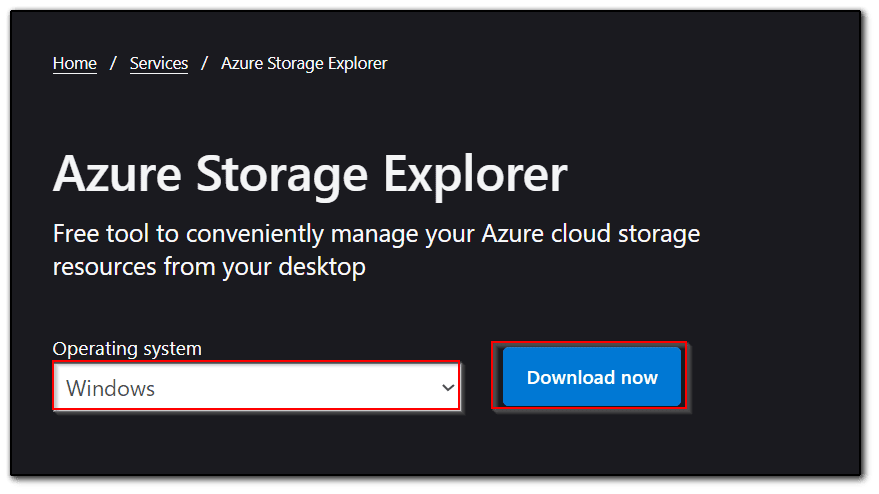
To connect to Azure resources using Storage Explorer, you can do any of the following two:
Sign in to Azure:
- Access your subscriptions and all their associated resources.
- Attach to an Individual Resource: Access directly to an individual Azure Storage resource without the need to log in to an Azure account.
These options come with flexibility depending on your needs.
- To access the full resources once you sign in, Storage Explorer needs both management and data layer permissions.
- You’ll require Microsoft Entra permissions for storage accounts, containers, and data. If you only have data layer access, connect by using the Sign in with Microsoft Entra ID option.
- To know the more specific permission requirements, refer to the troubleshooting guide on Azure Storage Explorer.
In Storage Explorer, go to the View menu and select Account Management, or simply click the Manage Accounts button to access account settings.
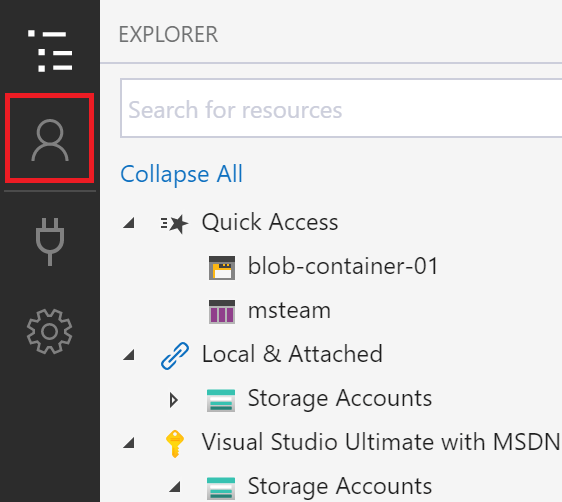
- To see your signed-in Azure accounts in Storage Explorer, open Account Management.
- To add another account, click Add an account.
- This will open the Connect to Azure Storage dialog. In the Select Resource panel, select Subscription to continue

- In the Select Azure Environment panel, select the Azure environment you want to sign in to, such as Global Azure, a national cloud or an Azure Stack instance, then click Next.

- After signing in with a webpage, Storage Explorer will display your Azure account and subscriptions associated with it under Account Management.
- Then select the subscriptions you wish to work with, and click on Apply.
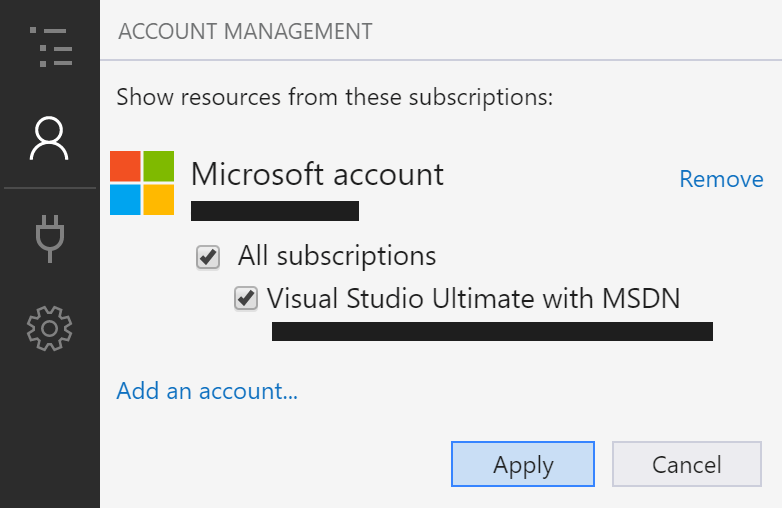
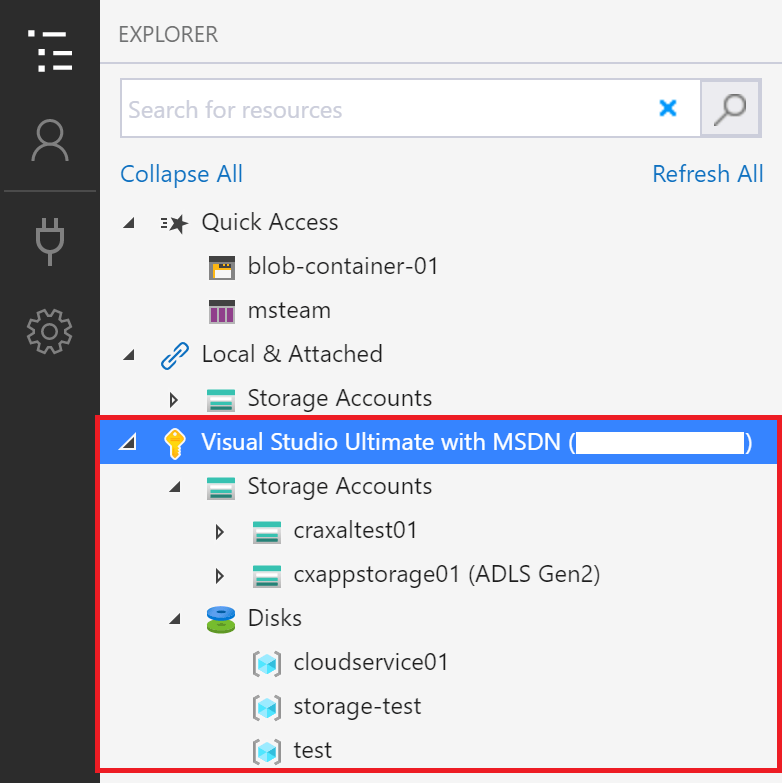
- Storage Explorer will display the storage accounts linked to the Azure subscriptions you selected, allowing you to easily manage and interact with your storage resources.
Attach to an individual resource
To access resources in Azure Storage Explorer, you can use various authentication methods depending on the type of resource:
- Microsoft Entra ID: Provides access to most resources, including storage accounts, blob containers, and queues.
- Account Name and Key: This works for storage accounts but not for all types of resources.
- Shared Access Signature (SAS): This applies to most resources, including blob containers, file shares, and tables.
- Public (Anonymous): Available for resources such as blob and Data Lake containers, but not for storage accounts.
In Storage Explorer, simply click Connect and follow the steps for the resource you wish to access.
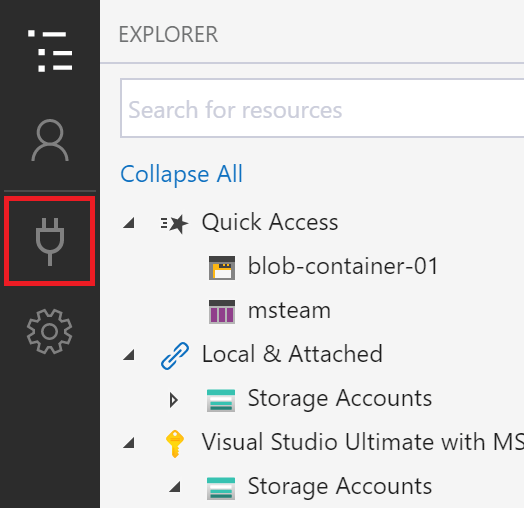
Here's how you can easily connect to your Azure resources by using Storage Explorer:
1.Microsoft Entra ID: Ideally used for access at the data layer. Once signed in, you can pick the resource type: Blob container, Data Lake Storage, Queue.
2.Account Name and Key: Connect using a storage account name and key. It is located under the Azure portal.
3.SAS Connection String: Use a connection string with a Shared Access Signature to connect to a storage account.
4.SAS URL: Use a Shared Access Signature URL for connecting to various resources like blob containers, file shares, etc.
5.Local Storage Emulator: Connect to local emulators like Azurite using specific ports.
Select the resource type in the Connect to Azure Storage dialog and follow the steps.
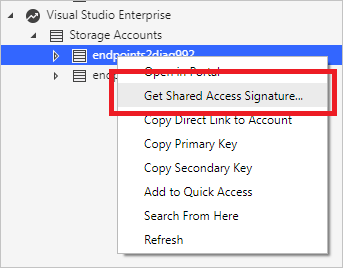
To create a Shared Access Signature (SAS) for a storage account in Storage Explorer:
- Right-click on the storage account you want to share.
- Then choose Get Shared Access Signature from the list.
- This will allow you to create a SAS, giving limited access to the storage account without the need to share your account key.
In the Shared Access Signature settings, choose the desired time frame and permissions for the storage account, then click Create to generate the SAS.
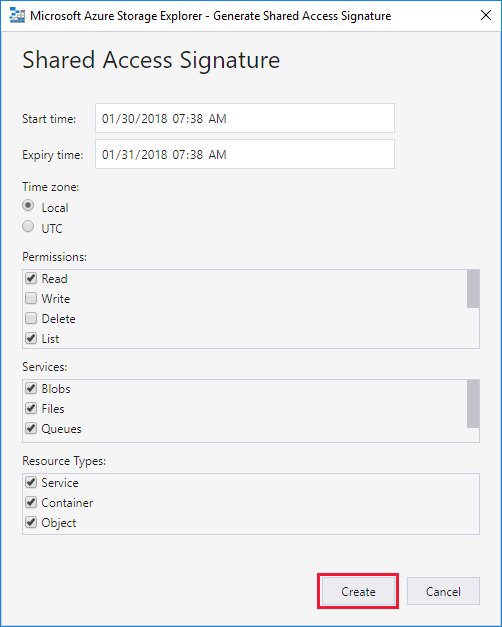
- Copy SAS Details: After creating a Shared Access Signature, copy the connection string or raw query string.
- Service-level SAS: You can obtain SAS at a service level, such as for a blob container.
- Search Resources: Use the EXPLORER pane’s search box to locate storage accounts or other resources by entering keywords.
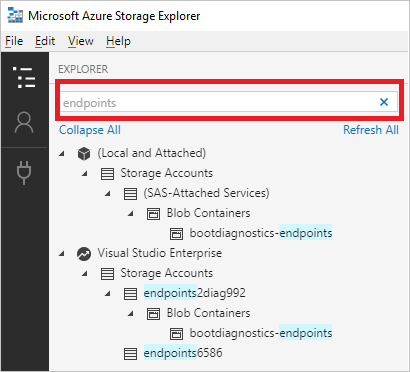
- Deselect Subscriptions: To speed up your search, uncheck subscriptions that don’t contain the item you’re looking for in Account Management.
- Search from Specific Node: Right-click a node and select Search From Here to begin searching from that specific location in your resource tree.
Best Practices for Using Windows Azure Storage Explorer
Secure Authentication:
- Always prefer using Azure Active Directory (Azure AD) for authentication. It offers secure, centralized identity management for enterprise environments, reducing security risks and making access control easy.
Use SAS:
- For any type of temporary or access-based restriction, SAS tokens will be used. This method allows access only to certain resources in storage using set permissions while it will only be available to the authorized personnel.
Storage Organisation:
- Organize your storage through the use of naming conventions applied to containers and resources. You will be able to track storage accounts, avoid confusion, and it will be easier to manage.
Implement Least Privilege Access:
- only grant permissions to access storage resources of those users that really need this. For instance, implement a role-based access control in the Azure AD while granting access based on the specific role or task of a given user.
Use Bulk Operations:
- Leverage the bulk operation features to upload, download, or delete multiple files in one go. This increases productivity, especially for large datasets or when transferring significant amounts of data between storage containers.
Monitor Activity:
- Enable logging and activity monitoring in Azure Storage Explorer to track operations performed on your storage resources. Monitoring helps to detect any unauthorized activity and makes it easier to troubleshoot issues.
Data Backups:
- Always maintain backups of critical data stored on Azure. Use the tool’s features to easily manage backups and restore data when needed, especially in case of unexpected issues or data corruption.
Review Permissions:
- Regularly review and update access controls and permissions. For example, if a user no longer needs access to a particular resource, revoke their permission promptly to reduce potential security vulnerabilities.
Carefully Manage Data Transfers:
- Use Data Transfer Acceleration in Windows Azure Storage Explorer for large data migrations or transfers. This makes it faster and easier to move data across containers.
Optimize for Performance:
- Ensure that you are using the right storage tiers (Standard, Premium, Archive) according to your needs, which optimizes costs and performance, especially for hot and cold data.
- Following these best practices will help users get the most out of their Azure storage management tasks in terms of functionality, security, and efficiency. The bottom line is to make sure that Azure storage is easy to manage and secure for teams, developers, and administrators.
Tips for efficiently managing your storage accounts.
Detailed Tips for Efficiently Managing Your Azure Storage Accounts:
- There would be consistent naming conventions on the storage accounts, containers, and blobs to systematize the sorting.
- That becomes easier with access from a resource which, in itself is not an easy task since the storage environment keeps growing. Naming should include the project names, region codes, as well as the other types of resources.
Leverage Automation:
- Automate routine tasks such as backups, file uploads, and migrations. These can save a lot of time.
- Use Azure CLI, PowerShell, or Azure Automation to create scripts that handle these operations automatically. Automation also reduces human error and ensures consistency in your processes
Use Role-Based Access Control:
- This is a means of managing access on a fine-grained level, where only the necessary permissions are granted to users and applications.
- For example, limiting access to sensitive data by granting the minimum necessary permissions reduces the risk of unauthorized access.
Use Shared Access Signatures (SAS):
- SAS tokens are useful in giving time-bound access to specific storage resources.
- Rather than sharing full access keys, create SAS tokens that specify permissions (read, write, delete) and expiry times, thereby reducing security risks.
Optimize Storage Tiers:
- Azure offers different storage tiers such as Hot, Cool, and Archive. Use Hot Storage for frequently accessed data, Cool Storage for infrequent access, and Archive Storage for long-term, low-cost data storage.
- Regularly review your data access patterns to move data to the appropriate storage tier, ensuring cost efficiency.
Regular Monitoring and Alerts:
- Set up activity logging and alerts in Azure for usage monitoring and detecting anomalies. Logging helps monitor operations like uploading files, deleting them, or
- access attempts. Configure alerts on anomalous events such as unfamiliar IP addresses for access or data changes, enabling quick responses to threats.
Use Bulk Operations:
- For large data sets, take advantage of bulk upload and download operations. Windows Azure Storage Explorer offers an easy way to handle bulk file transfers without uploading or downloading each file manually.
- This saves operational overheads for such operations and makes tasks like data migration or archiving much faster.
Backup Strategy:
- A good backup strategy is required to safeguard the data. Important data must be backed up using Azure Storage Explorer regularly so that it can be done easily and automatically.
- Larger datasets must be automated, with their respective backups kept in different tiers of storage or regions for higher redundancy.
Periodic Review of Permissions:
- Storage accounts should be audited periodically to ensure that users and services have access only to the resources they need.
- Check the permissions periodically and remove access for accounts or users who no longer need it. This is a very important thing in maintaining a secure storage environment.
Utilize Data Transfers and Synchronization:
A user can transfer files across different containers or accounts by using the Azure Storage Explorer and even transfer files between different regions.
- To migrate data, this would streamline the process significantly by removing redundant manual labor associated with transferring and replicating the data.
- Ensure consistency across environments through data synchronization.
How to handle large datasets and streamline daily tasks.
- In big data sets, and in order to have an efficient working day, there is a necessity to handle massive data in the cloud environment using Azure. Here are some detailed approaches on how large datasets can be managed:
1. Bulk Operations to Manage Data:
- Do not deal with each file manually; utilize the bulk upload/download, transfer, and delete functionality available in Windows Azure Storage Explorer.
- This eliminates time wastage on redundant tasks and accelerates data migration as well as its management.
2. Automate Routine Tasks:
- Automate tasks like backups, data synchronization, and file management through Azure CLI, PowerShell, or automation tools such as Azure Automation.
- This frees up time to focus on other important tasks, while the system takes care of the routine ones.
3. Optimize Data Access:
- Break the big data into smaller and more manageable pieces, such as time, project, or category, and then store in suitable tiers, that is, Hot, Cool, and Archive.
- This would minimize the cost since infrequently accessed data may be transferred to cooler or archived storage, whereas hot data is stored in a high-performance tier.
4. Leverage Data Transfer Tools:
- Use AzCopy or Azure Storage Explorer’s high-end data transfer feature to move large datasets with more efficiency.
- The tools are enabled for parallel operations, which transfer the data more rapidly than a human can manually handle.
5. Parallel Processing:
- For large datasets, use parallel processing techniques and split data into smaller chunks, process them simultaneously, which improves the processing time in significant ways especially in tasks such as data transformation, migration, or backups.
6. Use Data Compression:
- Compress large data before uploading, thereby reducing its size and the transfer speed. Most cloud storage tools, such as Azure Storage Explorer, accept compressed file formats.
7. Data Usage Monitoring:
- Set up logging and monitoring of your storage accounts to monitor data usage, transfers, and possible errors.
- This allows you to identify bottlenecks and inefficiencies in the handling of large datasets and act in time.
- Datasets can be in-sync across many locations or containers using the Azure Storage Explorer by leveraging its feature of synchronization, which results in consistency of data with minimal human effort, particularly in very large data distributions that are distributed over different distributed environments.
- With this in mind, workloads in general will most surely be lessened, more especially in dealing with manual operations through large sets, while it shall also remain very reliable and efficient in data management processes.
Why To Use Windows Azure Storage Explorer?
Windows Azure Storage Explorer presents the following advantages when dealing with efficient handling of resources for Azure Storage:
- It has an extremely user-friendly interface that streamlines the rather complex process of managing blobs, queues, tables, and files, making it easier for even a novice or an old user to efficiently handle Azure storage.
Cross-Platform Compatibility:
- Availability for use on Windows, macOS, and Linux environments.
Security and Flexibility:
- Allows multi-authentication methods, including Azure AD, SAS, and storage account keys, thus allowing access to your resources securely and customized.
Efficient Data Management:
- Suitable for Bulk operations. Uploading and downloading is simplified and streamlined for large datasets.
Integration with Azure CLI:
- Available for advanced users who can automate storage operations using the Azure CLI and thereby improve workflow automation.
Cost-Effective:
- It eliminates the need for third-party tools that are complex or expensive, making it easier for organizations to manage storage in a cost-effective manner.
Windows Azure Storage Explorer makes it easy for users to manage their Azure storage accounts, increase productivity, and maintain high levels of security and performance.
Comparison of Windows Azure Storage Explorer with Other Azure Management Tools:
Azure Portal:
- This is a full web-based interface through which all Azure services can be managed.
- It provides more powerful management abilities but tends to be slower and somewhat less intuitive on particular storage tasks than the Windows Azure Storage Explorer, which is optimized for managing storage.
Azure CLI/PowerShell:
- Microsoft Azure CLI and PowerShell offer command-line tools for the management of resources in the Azure environment with great scopes in respect to automation.
- However, these tools are more complex to use and need knowledge about scripting. Windows Azure Storage Explorer uses a GUI that is easier to use for personnel operations and day-to-day usage.
Azure Storage Management SDKs:
- Microsoft provides SDKs for developers to interact programmatically with storage.
- They are pretty powerful for custom applications but require coding skills, which makes it less user-friendly than Windows Azure Storage Explorer, targeted at both technical and non-technical users.
AzCopy is a command-line utility that was developed specifically to allow for an efficient transfer of data between Azure Storage accounts. It is very fast and, hence, well-suited for bulk operations. It does not have the complete features of Windows Azure Storage Explorer, which can fully manage your Azure storage; features include browse, edit, and view your data.
Azure Storage Management Tools:
- Other tools to manage such storage, though available in forms like Cloud Berry Explorer or Storage Explorer for Azure, are not always native Microsoft solutions.
- Windows Azure Storage Explorer, on the other hand, is a Microsoft supported, fully-integrated tool for ensuring consistency in all its related services. In the long term, this provides more reliability.
Summary:
- Windows Azure Storage Explorer is a simplified, user-centric tool to administer resources for Azure Storage.
- Although not as comprehensive an interface as the Azure Portal or CLI, it has managed storage-related work really well and feels so natural both to beginners and experienced users alike.
Time-Saving Advantages of Windows Azure Storage Explorer:
Bulk Operations:
- The tool saves time by allowing users to manage large datasets at once through bulk uploads, downloads, and deletions.
Simple File Management:
- Users can easily navigate and manage resources without having to deal with complex configurations or command-line tools.
Cross-Platform Support:
- With support for Windows, macOS, and Linux, users can seamlessly work across various platforms, eliminating the need for specialized tools for each operating system.
User-Friendly Design:
- It has a clean and simple interface to let users with even less deep technical knowledge get it quickly in place.
Easy Navigation:
- Menus are very easy to navigate with drag and drop functionality. Thus, file management and browsing in and across the storage accounts becomes smoother.
Low Learning Curve:
- Windows Azure Storage Explorer makes the process of handling Azure storage less complicated for beginners and veterans alike, hence no deeper technical knowledge requirement.
Overall, it is a perfect tool for those and teams seeking to manage Azure storage efficiently in a simple design and time-saving feature.
Conclusion
This blog post discussed how Windows Azure Storage Explorer makes handling Azure storage account management easier with a user-friendly design, cross-platform compatibility, and efficient bulk operations.
It is a very handy tool for any newcomer and the experienced alike who saves time while leaving room for flexibility in blob and queue, as well as tables handling.
We encourage you to download Windows Azure Storage Explorer today and start managing your storage resources more efficiently.
Additional resourses:
FAQ's of microsoft azure storage explorer !
- Azure Storage Explorer allows you to quickly view all the storage services under your account. You can browse through, read, and edit data stored in those services through a user-friendly graphical interface.
- Start free.
After your credit, move to pay as you go to keep building with the same free services. Pay only if you use more than your free monthly amounts.
- Azure Cosmos DB Data Explorer is a web-based interface that allows you to view and manage the data stored in Azure Cosmos DB.
- Azure Data Explorer is a fast, fully managed data analytics service for real-time analysis on large volumes of data streaming from applications, websites, IoT devices, and more.
- Azure Blob Storage is Microsoft’s object storage solution for the cloud. Blob Storage is optimized for storing massive amounts of unstructured data, such as text or binary data. Blob Storage is ideal for: Serving images or documents directly to a browser.
- Microsoft Azure Storage provides a massively scalable, durable, and highly available storage for data on the cloud, and serves as the data storage solution for modern applications. Connect to File Storage to perform various operations such as create, update, get and delete on files in your Azure Storage account.
- Data in a new storage account is encrypted with Microsoft-managed keys by default. You can continue to rely on Microsoft-managed keys for the encryption of your data, or you can manage encryption with your own keys. If you choose to manage encryption with your own keys, you have two options.
- What are Azure blobs? A blob is a binary, large object and a storage option for any type of data that you want to store in a binary format.